
Your website worked fine when you were small. Three product pages, a contact form, maybe a blog nobody updated for six months. Nobody noticed the platform underneath because nobody had to.
Then the business actually started growing, and the CMS stopped being invisible.
Finding the best CMS for a growing business isn’t a one-time decision you make and forget. It’s a question every scaling company eventually has to answer, usually at the worst possible moment.
Your CMS Wasn’t Built for Where You’re Going
Here’s the moment most founders hit: marketing wants to launch a new landing page every week, but every change now needs a developer. Sales wants product data synced across the website, the app, and a partner portal, and the current setup can’t touch anything outside the website. IT wants to sleep at night, but the plugin-heavy content management system running the site has become the thing keeping them up.
This is the part nobody warns you about when you first pick a CMS. Most small businesses choose a content management system based on what’s cheap and fast to set up, not what can actually serve as a CMS for a growing business carrying five times the traffic, three times the content, and a team that’s no longer one person wearing every hat. That gap between “what got us here” and “what we actually need now” is where a lot of good businesses lose momentum.
What Happens When You Outgrow the Wrong CMS
Ignore the mismatch long enough and it stops being an inconvenience and starts costing money.
Security becomes a real liability, not a hypothetical one. The most widely used CMS platform in the world logged 11,334 new vulnerabilities in 2025 alone, a 42% jump over the year before, and 91% of them showed up in plugins rather than the core software, according to Patchstack’s State of WordPress Security report. Attackers now start exploiting a disclosed flaw within roughly five hours on average. If your website security depends on a stack of third-party plugins you installed two years ago and forgot about, that’s not a small risk anymore, that’s an open door. And exploited vulnerabilities became the single most common way attackers got into networks in 2025 for the first time in nearly two decades, according to Verizon’s Data Breach Investigations Report, as summarized by Swif.
Content bottlenecks slow down everything else. When every homepage tweak or product update has to go through a developer queue, marketing campaigns ship late, sales collateral goes stale, and the team quietly stops asking for changes because it’s not worth the wait. That’s a website management problem disguised as a staffing problem.
Growth outpaces the architecture. A CMS that only knows how to spit out a webpage can’t hand content to your mobile app, your kiosk, or whatever channel shows up next year. You end up duplicating content by hand across systems, which is exactly the kind of manual work a growing team can’t afford.
And eventually, someone says the word “migration.” A poorly planned CMS migration is one of the most expensive mistakes a scaling company can make: broken URLs, tanked SEO rankings, lost historical content, and weeks of developer time spent untangling a system nobody fully documented.
None of this is inevitable. It’s what happens when the CMS decision gets made once, early, and never revisited.
Matching the CMS to the Business You’re Becoming

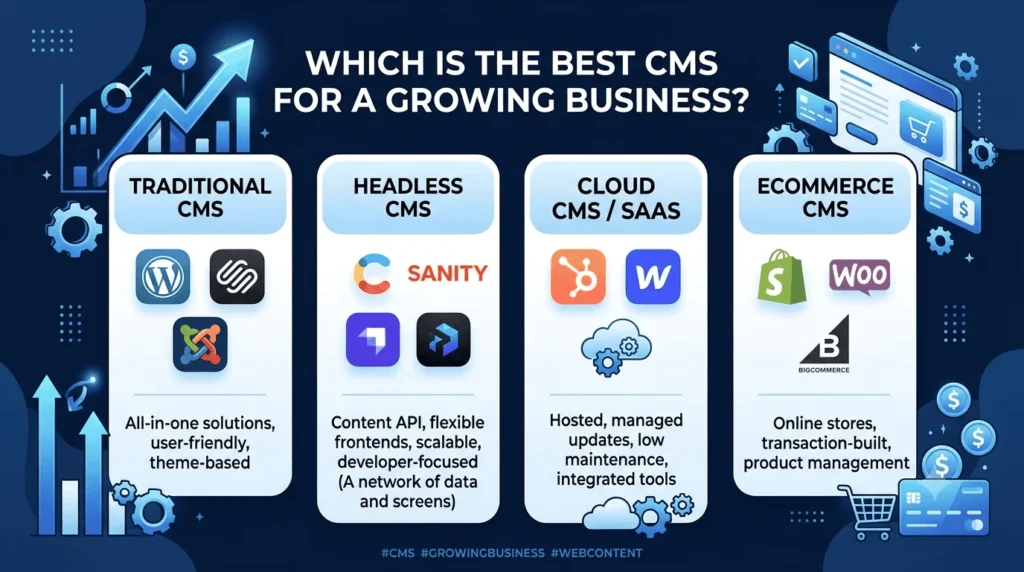
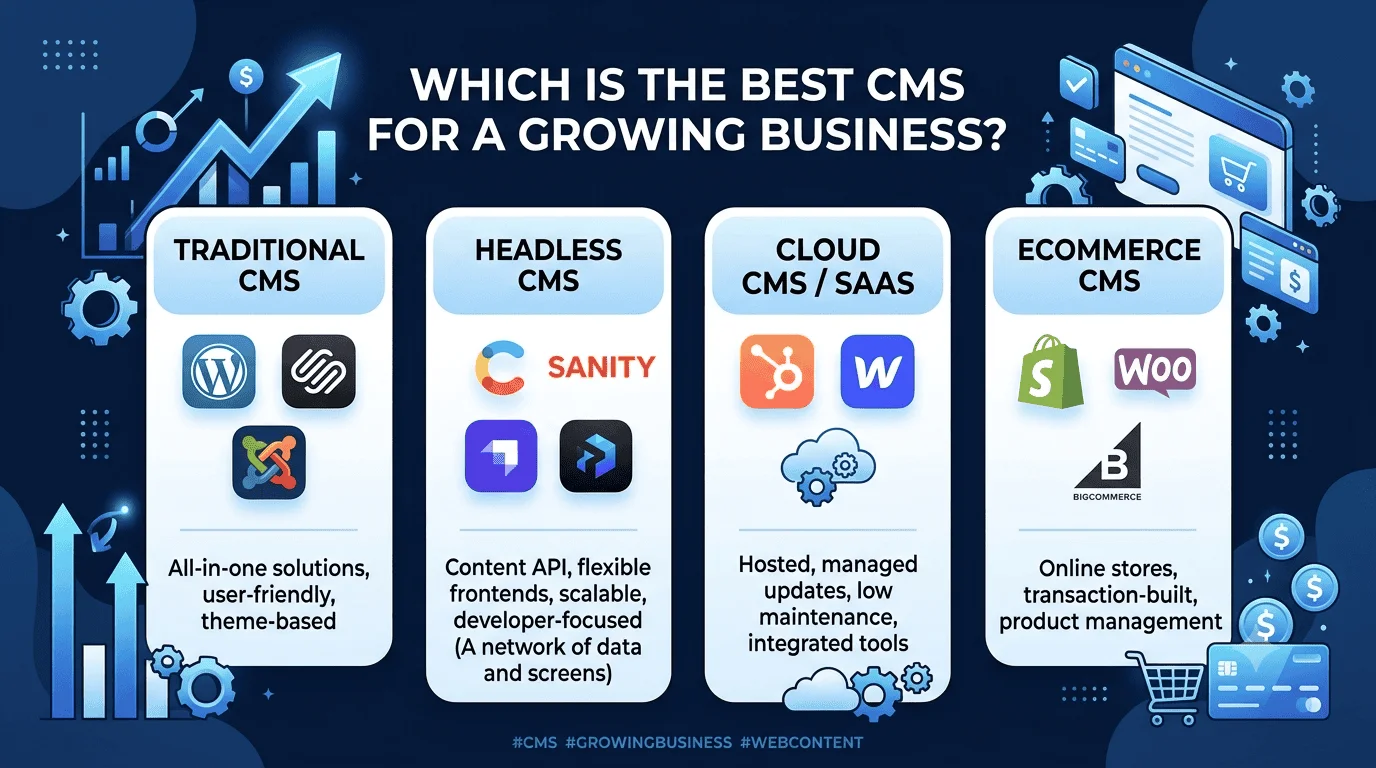
There’s no single best CMS for a growing business that fits every company. There’s a right category for your stage, your team, and where you’re headed. Here’s how the main options actually stack up.
Traditional CMS (WordPress, Squarespace, Joomla)
A traditional CMS bundles the editor, the database, and the frontend into one system. You log in, you write, you publish, and the same platform renders the page.
Best for: businesses that need one website, a non-technical team that wants a visual editor, and content volume that doesn’t need to reach anything beyond a browser.
The upside is real: it’s fast to launch, editors don’t need training, and the ecosystem of themes and plugins is enormous. WordPress alone still powers roughly 41–43% of all websites on the internet, per W3Techs’ usage statistics, so support and talent are easy to find.
The downside is the same plugin ecosystem that makes it flexible also makes it fragile. Every added plugin is another maintenance obligation and another potential entry point. If you go this route as you scale, budget for ongoing website security work as a fixed cost of doing business, not an occasional cleanup task.
Headless CMS for a Growing Business (Contentful, Sanity, Strapi, Payload)
A headless CMS stores your content and exposes it through an API, with no built-in frontend at all. Your developers build the website, app, or kiosk display separately and pull content in from wherever it lives.
Best for: companies planning to serve content to more than one channel, or that already have (or plan to hire) frontend developers.
This is often the CMS for a growing business that’s already expanding beyond a single website, and the category built specifically for business growth across multiple channels. According to Kontent.ai’s CMS comparison, a decoupled architecture also tends to be more secure by default, since there’s no public-facing admin panel tied directly to your live site for attackers to target. The headless CMS market itself is projected to grow from around $3.94 billion in 2026 to $22.28 billion by 2034, which tells you where enterprise and mid-market budgets are already moving, per data cited by InMotion Hosting.
The tradeoff is upfront cost. You’re not installing a theme, you’re commissioning custom website development work to build the actual frontend. That’s a heavier lift for a five-person company than it is for one with an in-house engineering team.
Cloud CMS / SaaS Platforms: A Low-Maintenance CMS for a Growing Business (HubSpot CMS, Webflow)
A cloud CMS runs entirely on the vendor’s infrastructure. You don’t manage servers, patch software, or worry about hosting configuration, because the vendor handles all of it.
Best for: marketing-led teams that want a managed, always-updated platform without an in-house IT function, especially if the site is already tied into a CRM.
The appeal here is operational simplicity. Updates happen automatically, uptime is the vendor’s problem, and you get built-in scaling for traffic spikes. The catch is cost and flexibility: a cloud CMS with full CRM integration can run several hundred dollars a month or more once you’re past the entry tier, and you’re working within the vendor’s constraints rather than owning the stack outright.
Ecommerce CMS: The Right CMS for a Growing Business Built on Transactions (Shopify, WooCommerce, BigCommerce)
If products, checkout, and inventory are the center of your business, general-purpose CMS platforms usually aren’t enough on their own. An ecommerce CMS is built around catalog management, payment processing, tax and shipping logic, and inventory sync from day one.
Best for: any growing business where transactions, not just content, are the primary job of the website. This is where the label “CMS for a growing business” gets literal: the platform has to manage content and revenue at the same time.
The decision here often comes down to how much customization you need. WooCommerce sits on top of WordPress and gives you full control at the cost of the same plugin-security tradeoffs mentioned above, and it remains the most common choice for smaller merchants who want that flexibility without a big budget, per Coalition Technologies’ 2026 ecommerce CMS market share data. Shopify and BigCommerce trade some flexibility for a managed, PCI-compliant environment that’s genuinely lower-maintenance for a lean team.
How to Actually Decide on a CMS for a Growing Business
A practical way to cut through this: answer three questions honestly.
- Do you have developers on staff or on retainer? If not, lean traditional or SaaS. If yes, headless opens up real advantages.
- Will your content need to reach more than a website in the next 18 months? An app, a partner integration, a kiosk. If the answer is yes, a headless or hybrid setup will save you a rebuild later.
- What’s your actual risk tolerance for downtime and breaches? A public-facing site with a large plugin footprint needs a real security budget. A cloud CMS shifts that burden to the vendor, at a price.

Whatever you choose, plan the CMS migration before you need it, not during a crisis. Map every URL, export content in a structured format, and test the new system with a content subset before the full cutover. A rushed migration is how businesses lose search rankings they spent years building.
There’s also no rule that says you have to pick just one category forever. Plenty of companies start on a traditional CMS, outgrow it within two or three years, and migrate to a headless setup once the team and the content demands justify it. The best CMS for a growing business today might not be the best CMS for that same business in 2029, and that’s fine. The goal isn’t permanence, it’s picking something that won’t need to be ripped out before it’s paid for itself.
Where This Actually Leads
Picking the right CMS for a growing business isn’t really about the software. It’s about deciding how much friction your team is willing to tolerate between having an idea and shipping it. The businesses that keep growing smoothly are usually the ones that matched their content management system to next year’s problems, not last year’s budget.
If you’re evaluating your options right now: audit what’s actually slowing your team down today, get honest about whether you have (or need) developer resources, and treat website security as a line item rather than an afterthought. The right CMS for a growing business won’t just host your content. It’ll get out of the way of the business you’re trying to build, whether that means a leaner traditional setup, a fully custom headless build, or a managed cloud platform that lets your team focus on the business instead of the backend.
