
A visitor lands on your business website. Twelve seconds later, they’re gone. No purchase, no form fill, not even a scroll past the fold.
You didn’t lose them to a competitor with a better product. You lost them because your site didn’t look like a trustworthy website, the kind of place people feel safe handing over their money or their email address. That’s the uncomfortable truth about running a trustworthy website: people decide whether to trust you before they’ve read a single word of your copy.
You’re Bleeding Customers You Never Even Meet
Here’s what makes this frustrating. You might have the best product in your niche, real testimonials from happy clients, and prices that beat everyone around you. None of that matters if your website doesn’t look like a trustworthy website in the first five seconds.
Nielsen Norman Group’s research on web credibility identified four durable factors behind how a trustworthy website communicates trustworthiness: design quality, upfront disclosure, comprehensive content, and a visible connection to the rest of the web. That research is a decade old, and it still holds, because it’s not really about design trends. It’s about how humans size up strangers, whether that stranger is a person or a business website.
The stakes are higher now than when that study came out. Online reviews influence the vast majority of purchase decisions, and BrightLocal’s 2026 Local Consumer Review Survey found that 97% of people read reviews before choosing a local business, with a growing share now refusing to work with anyone rated below 4.5 stars. If your website doesn’t back up your reputation with visible, current proof, you’re already behind before the visitor reads your headline and that’s not a trustworthy website, that’s a liability.
Why “Looking Fine” Isn’t the Same as Looking Trustworthy
Most business owners think their site is fine. It loads, it has a contact page, it lists services. The problem is that “fine” and “trustworthy website” aren’t the same bar.
A trustworthy website has to survive a much harsher test than “does it work.” It has to survive a stranger’s gut check, and that gut check runs on things founders rarely audit for themselves:
- Inconsistent website branding. Your logo says one thing, your color palette says another, and your tone of voice on the About page reads like a different company wrote it. Buyers register this as sloppiness, even if they can’t name what’s off, and sloppiness is the opposite of a trustworthy website.
- A design that hasn’t been touched since 2016. Visual design is one of the strongest predictors of perceived competence. If your website UI looks dated, visitors quietly assume your business practices are dated too.
- Slow page speed. Every extra second of load time chips away at conversions, and it also reads as neglect. A trustworthy website loads fast; a business that can’t be bothered to fix a slow homepage doesn’t inspire confidence that it’ll handle your order correctly.
- No client testimonials, or testimonials nobody believes. A wall of five-star quotes with no names, no photos, and no way to verify them isn’t social proof. It’s decoration.
- A layout that breaks on phones. More than half your traffic is probably mobile. A non-responsive website tells that half of your audience, immediately, that you didn’t think about them.
- No visible security or transparency signals. No HTTPS padlock, no clear pricing, no real address, no way to contact a human. Visitors don’t debate this consciously. They just leave.
Individually, each of these feels minor. Stacked together, they’re why a technically functional site still isn’t a trustworthy website, and still fails to convert. This is the gap the popular “credibility checklist” articles tend to skip: they list the visible stuff (logo, testimonials, SSL badge) but rarely explain the compounding effect, or the technical trust signals search engines and browsers themselves now flag to visitors before your copy gets a chance.
The Real Website Checklist for Looking Trustworthy
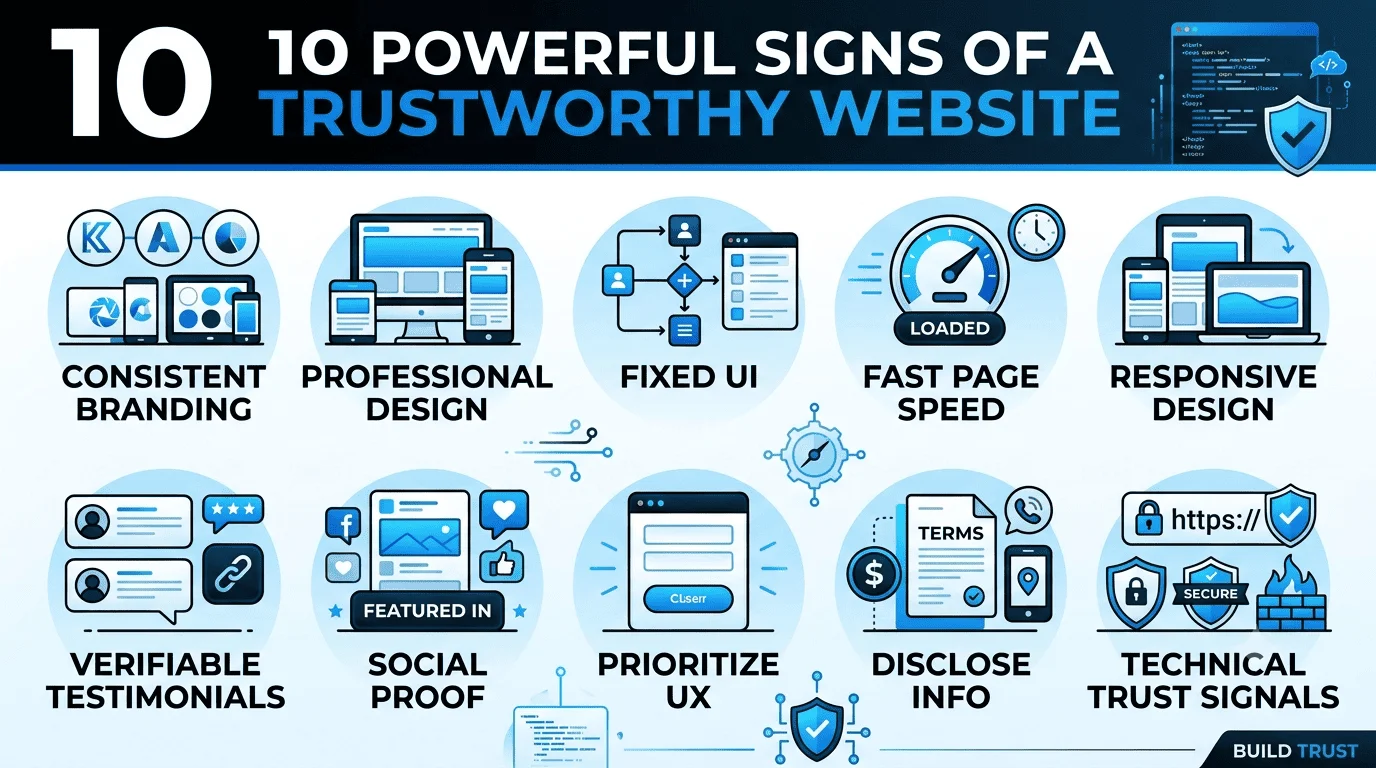
Here’s what actually moves the needle if you want a genuinely trustworthy website, broken into the categories that matter, including a few the top-ranking guides gloss over.
1. Get Your Website Branding Consistent Everywhere
Trust starts with recognition. Your logo, fonts, and color scheme should look identical whether someone finds you on Google, Instagram, or a printed invoice. Inconsistent branding is one of the fastest ways to stop a professional website from reading as a trustworthy website. Pick a palette, a type system, and a tone of voice, then apply them everywhere, including error pages and email footers people rarely think about.
2. Invest in a Genuinely Professional Website, Not a Template Afterthought
A professional, trustworthy website doesn’t need to be expensive, but it needs to look intentional. That means:
- A clear, single headline that says what you do and for whom
- Whitespace that isn’t accidental
- Typography that’s legible at a glance
- No stock photos of people laughing at salads
Nielsen Norman Group’s research found that when price and offerings between two competing companies were similar, website design quality became the deciding factor, and even something as small as a typo was enough to make a participant question a moving company’s attention to detail. Small visual mistakes cost real business, and they’re the fastest way to undo months of work building a trustworthy website.
3. Fix Your Website UI Before You Touch Your Copy

Your website UI is the layer people interact with before they read anything. Clear navigation labels, obvious buttons, and a logical flow from homepage to checkout or contact form all signal competence. Confusing menus make visitors wonder if the same disorganization runs through your business, which is a fast way to look like anything but a trustworthy website.
4. Treat Page Speed as a Trust Signal, Not Just an SEO Metric
Most checklists treat page speed purely as a ranking factor. On a trustworthy website, it’s also a credibility factor. Google’s own Core Web Vitals guidance ties load time directly to user experience and abandonment rates, and a site that stutters, jumps, or takes several seconds to become interactive feels unreliable before a visitor forms any opinion about your business itself. Run your site through Google PageSpeed Insights, fix render-blocking scripts, and compress your images. This single fix often does more for conversion optimization than a full copy rewrite, and it’s one of the cheapest ways to look like a trustworthy website fast.
5. Make It a Responsive Website, Full Stop
A responsive website isn’t a bonus feature on a trustworthy website in 2026, it’s the baseline. Test your site on an actual phone, not just a resized browser window. Check that forms are fillable with a thumb, that text doesn’t require pinching to read, and that buttons aren’t stacked on top of each other. Mobile visitors who hit a broken layout don’t file a bug report. They just close the tab, and a business that loses that many mobile visitors was never really running a trustworthy website to begin with.
6. Use Client Testimonials People Can Actually Verify
On a trustworthy website, client testimonials with a photo, a job title, or a link to a real profile carry weight. Anonymous quotes don’t. Where possible, pull reviews from external platforms like Google Business Profile or Trustpilot rather than writing them yourself, because visitors are naturally skeptical of praise a company controls entirely. This is also where social proof does its heaviest lifting: third-party validation reads as more honest than anything you say about yourself, and it’s one of the fastest paths to a trustworthy website in a visitor’s eyes.
7. Build Social Proof Beyond the Testimonials Page
Social proof isn’t one widget on a trustworthy website, it’s a pattern repeated throughout the site. Client logos on the homepage, case studies with real numbers, review scores in the header, media mentions, and visible follower counts on active social accounts all tell the same story from different angles: other people already trusted this business, and it worked out.
8. Prioritize Website UX Over Clever Design
Website UX is the quiet work of removing friction. Can someone find your pricing without emailing you? Can they book a call in under three clicks? Do your forms ask for the bare minimum, or fifteen fields nobody needs upfront? Every point of friction is a point where trust can leak out, because unnecessary friction reads as either incompetence or a hidden agenda (neither of which belongs on a trustworthy website).
9. Disclose Pricing, Policies, and Contact Info Upfront

Hiding your pricing behind a “contact us for a quote” form is one of the fastest ways to turn a trustworthy website into one visitors don’t believe, and to lose a visitor who was otherwise ready to buy. Show real contact details, a physical address if you have one, your return or refund policy, and pricing ranges even if exact quotes vary. Upfront disclosure was one of the four original trustworthiness factors identified in Nielsen Norman Group’s research, and it hasn’t lost relevance since.
10. Don’t Skip the Boring Technical Trust Signals
This is the part most competing guides mention briefly and move past, even though it quietly decides whether your site reads as a trustworthy website. It deserves more attention:
- HTTPS and a valid SSL certificate, issued free through services like Let’s Encrypt. Browsers now actively flag unsecured pages, which does real damage before a visitor even reaches your homepage.
- A custom domain email address for your contact form and support, not a free Gmail address on your “About” page.
- Accessibility basics. Alt text, readable contrast, and keyboard navigation aren’t just compliance boxes. The W3C’s Web Content Accessibility Guidelines exist because a site that locks out disabled users looks careless to everyone else too, and careless is never a trustworthy website.
- An up-to-date copyright year and active blog or news section, which signals the business is still operating and paying attention.
- A working 404 page with a way back to the homepage, instead of a dead end.
None of these are glamorous. All of them are checked, consciously or not, by visitors deciding whether they’ve landed on a trustworthy website that deserves their trust.
Conclusion
A trustworthy website isn’t one big feature. Building a trustworthy website means stacking dozens of small, consistent signals on top of each other: branding that matches, a professional website that loads fast, a responsive website that works on any device, real client testimonials, visible social proof, and the unglamorous technical basics that browsers and skeptical visitors both check for.
Run your own site through this trustworthy website checklist honestly. Most businesses fail two or three points without realizing it, and those two or three points are usually costing more conversions than any headline rewrite ever would. Fix them, and you’re no longer hoping your site looks like a trustworthy website.
